It's Always DNS — Until You're Stuck and Can't Fix It
DNS fails in specific, predictable ways: UDP truncation, TTL propagation lag, and the distributed deadlock that occurs when your recovery tools depend on the thing that is broken.
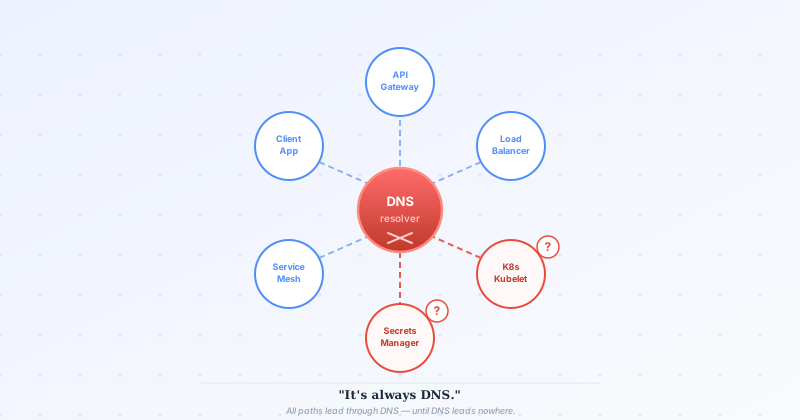
Every outage war story eventually arrives at the same punchline. The post-mortem is half-written, the timeline is reconstructed, the engineers are running on cold coffee — and then someone says it. It was DNS.
The room groans. It is always DNS.
But “it was DNS” is not an explanation. It is the beginning of one. DNS fails in specific, predictable ways. The teams that get paged the least are the ones who have internalized those failure modes and designed around them before the outage clock starts ticking.
Why DNS Is Everywhere (and Why That Is a Problem)
DNS started as a directory service. You give it a name, it returns an address. Simple.
That simplicity is exactly why it became load balancing, failover mechanism, traffic routing policy, canary deployment lever, geo-routing engine, and health signal, all at once, in most production systems today. It was never designed to be any of those things.
The gap between what DNS was built for and what it is asked to do in modern infrastructure is where outages live.
UDP and TCP: The Protocol Choice Nobody Talks About
DNS defaults to UDP on port 53. UDP is fast, connectionless, and has a hard ceiling: 512 bytes per response (expanded to 4096 bytes with EDNS0, but still finite). When a response fits in that limit, the conversation is one packet out, one packet back. Fast and fine.
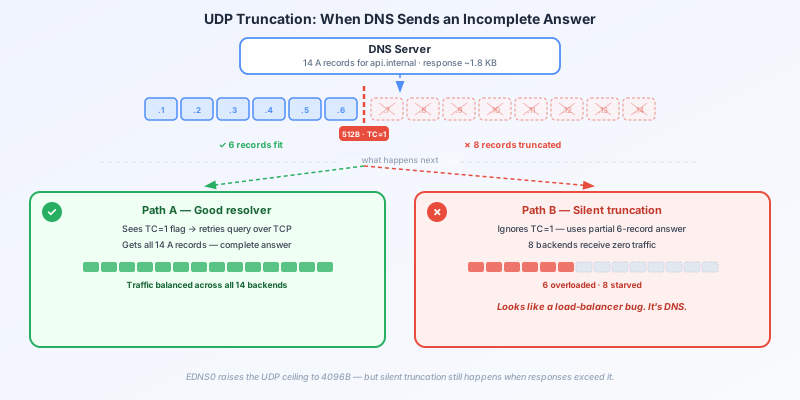
The problem starts when responses grow. A service with many A records, a large SRV record set, or a response carrying DNSSEC signatures can exceed the UDP payload limit. When that happens, the server sets the truncation bit (TC=1) in the response and sends back whatever it has room for — a partial answer.
Client -> DNS server (UDP): query for api.internal
DNS server -> Client (UDP): [TC=1] here are 6 of 14 records, response truncated
What does your application do with a truncated response? Usually one of two things:
- It retries over TCP automatically (if the resolver is well-behaved).
- It silently uses the partial response as if it were complete.
Option 2 is the dangerous one. A client that treats a truncated UDP response as authoritative has just reduced its backend view to a subset of the real pool. Traffic concentrates on the six addresses it knows about. The other eight receive nothing. If load is uneven, those six instances start falling over. From the outside, it looks like a load balancing problem, not a DNS problem.
The fix: configure your internal resolvers and service mesh sidecars to use TCP for DNS when record sets are large, or keep DNS responses lean by not overloading a single record with too many entries. Split large record sets across multiple names if needed.
DNS as a Control Plane: Where It Works and Where It Does Not
DNS works well as a read path for service addresses. It does not work well as a control plane for live traffic management.
Consider the classic failover scenario. A primary region starts returning 5xx. The on-call engineer updates the DNS record to point to the secondary region. The change propagates. Traffic shifts. Problem solved.
Except: DNS TTLs.
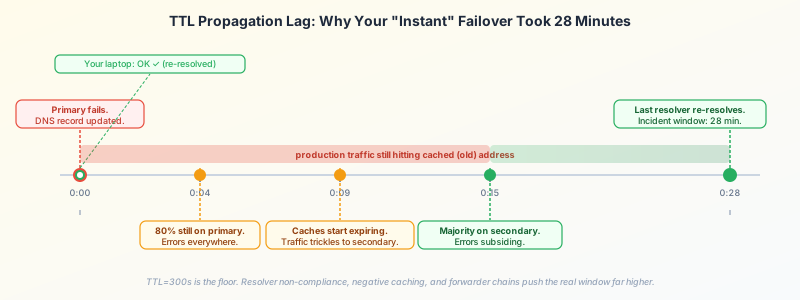
If your records have a TTL of 300 seconds, every resolver in the path (the stub resolver on the instance, the recursive resolver at the VPC layer, the forwarder in your private zone) has cached the old answer and will continue serving it for up to five minutes. In practice, some resolvers ignore TTLs entirely and cache longer. The “instant” failover you planned takes 5 to 30 minutes to actually happen.
Time 0:00  -> Primary fails. DNS record updated to secondary.
Time 0:00  -> Your laptop resolves and hits secondary. Works!
Time 0:04  -> 80% of production instances still hitting primary. Still failing.
Time 0:09  -> Resolver caches start expiring. Traffic trickles to secondary.
Time 0:28  -> Last stubborn resolver finally re-resolves. Incident window: 28 minutes.
For non-critical traffic, that window is acceptable. For your control plane (the services that orchestrate health, configuration, and coordination), it is not.
Rule of thumb: use DNS to bootstrap, not to operate. Services should resolve an address at startup and use it. For real-time routing decisions, that address should point to something with its own health-aware routing layer (a load balancer, a service mesh control plane), not to a raw instance fleet where DNS is the routing layer. How that routing layer detects and reacts to failure is a separate problem, covered in The Instance Is Up. Or Is It?.
The Outage You Cannot DNS Your Way Out Of
Here is the failure mode that ends careers: you relied on DNS to reach your service discovery or secret management system. DNS goes down. Now the systems you would use to fix DNS cannot start because they cannot resolve anything.
It is a distributed systems deadlock. Every recovery action requires DNS. DNS is the thing that is broken.
Real examples of this pattern:
- A Kubernetes cluster whose kubelets resolve the API server by DNS name. CoreDNS fails. Kubelets cannot reconnect. The API server is healthy but unreachable.
- A secrets manager accessed exclusively by hostname. DNS for the internal zone is broken. Services cannot start. Services cannot fetch the credentials needed to fix anything.
- A database accessed by service name. Name resolution fails. Applications throw connection errors. Engineers try to restart the application, but the restart process itself resolves the database hostname.
Each of these is recoverable. None of them are fast.
What to Do: Build DNS Independence Into Your Critical Path
The solution is not to eliminate DNS. It is to ensure your most critical services have a DNS-independent fallback.
1. Use IP Addresses for Must-Reach Services
For a small set of truly foundational services (your API server, your internal CA, your configuration store), maintain hardcoded IP addresses alongside the DNS names. Document them. Put them in runbooks. Put them in the infrastructure-as-code that provisions your instances.
When DNS fails, an engineer with a runbook and a list of IPs can keep moving.
2. Cache Resolutions Locally
Sidecar proxies like Envoy and services running the Consul client maintain an in-process cache of resolved addresses. Even if the upstream DNS service disappears, the cache keeps the connections alive for some window of time. Size your cache TTLs to give your on-call enough time to respond.
This is not a permanent fix: it is a blast radius limiter. It buys you time.
3. Separate DNS Infrastructure by Criticality
Run your control plane services on a separate DNS zone backed by a separate resolver cluster. If application-tier DNS falls over, control plane resolution stays up. If you are on Kubernetes, this means CoreDNS for application service discovery and a separate, static resolver for the API server itself.
4. Test DNS Failure Explicitly
DNS failure is easy to simulate and almost never included in chaos testing. Block UDP/TCP port 53 at the host firewall and watch what happens. Which services die immediately? Which ones keep running on cached addresses? Which ones cannot restart?
The services that cannot restart after a DNS failure are your risk inventory. Work backwards from that list.
Recovery Without DNS
When you are in the middle of a DNS outage, you need two things: a way to reach things, and a way to fix things without the thing that is broken.
Keep a local /etc/hosts file pattern ready for your critical internal names. It is ugly and manual, but echo "10.0.1.5 api.internal" >> /etc/hosts has ended more outages than any sophisticated tooling. Better: automate the maintenance of static host entries for your tier-zero services as part of your AMI or instance bootstrap, present at startup, independent of DNS, updated by your configuration management system using IP addresses.
DNS is infrastructure. Like any infrastructure, it fails. The engineers who recover fastest are not the ones who prevented every DNS failure — they are the ones who made sure DNS failure did not prevent them from doing anything else.
It is always DNS. Make sure when it is, you still have options.